Magic Drums
Turn your trackpad into a drumpad. Native macOS, web UI, Python under the hood.
How I built it
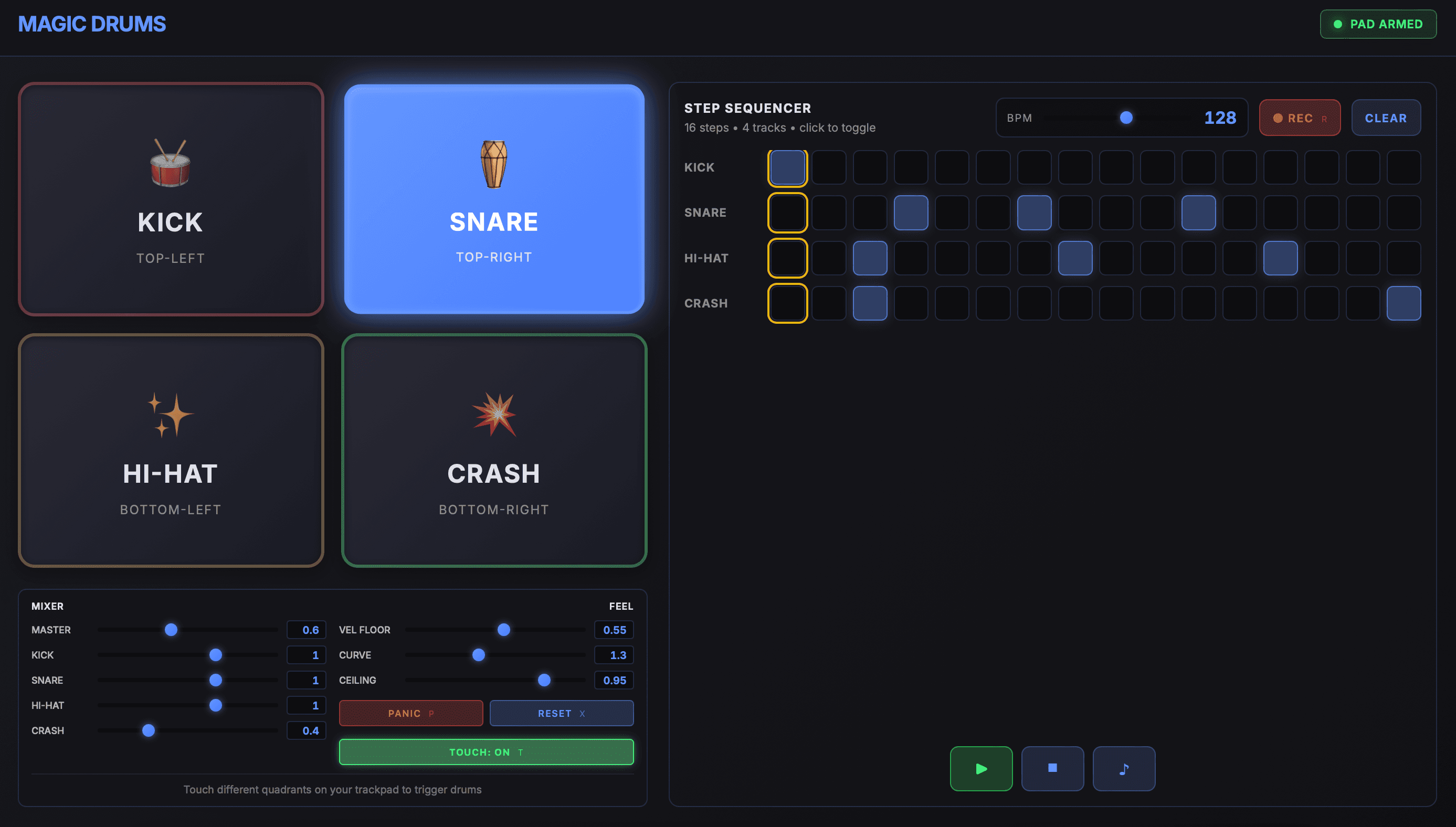
Magic Drums is a macOS-only app: the built-in Force Touch trackpad becomes a four-pad drum surface, and a 16-step, 4-track sequencer in the UI lets you build drum loops. The interface is a single HTML/CSS/JS page inside a WKWebView. On top of that I put a transparent Cocoa overlay so the window still receives trackpad touches and pressure. Audio is handled natively in Python with sounddevice and a small synth engine; the sequencer runs in JavaScript and drives both WebAudio and the Python engine over a JS ↔ Python message bridge.
Stack: Python 3 + PyObjC (Cocoa, WebKit), WKWebView, JavaScript (WebAudio, step sequencer), sounddevice + NumPy in the audio callback, and a few threads—main for Cocoa/overlay, one for the audio callback, and daemon threads to keep the WebView UI in sync with overlay state.
Architecture
The overlay sits on top of the WebView so it gets trackpad and key events first; it's transparent so you only see the HTML UI. The WebView loads one HTML string (no external URLs), and the only way JS talks to Python is window.webkit.messageHandlers.mixer.postMessage(...). A single script message handler, MixerMessageHandler, dispatches by message type and either updates overlay state or triggers a drum voice. Audio runs on a background thread: a sounddevice.OutputStream callback reads the overlay's voice list and volumes, generates one-shot synth, and writes frames.
- Trackpad (touch + pressure)
- Keyboard (P/R/X/T/Space)
- Clicks in WebView (pads, sliders, sequencer grid)
- touchesBegan / pressureChange / keyDown
- quadrant + velocity → _trigger_voice()
- 4 drum pads, mixer sliders, 16-step × 4-track sequencer
- window.webkit.messageHandlers.mixer.postMessage({ ... })
pad_hit, recording
_state, sequencer_edit
startAudio() →
sounddevice.OutputStream
one-shot synths,
mix & output
Startup
Entry point is html_trackpad_split.py: it adds the project root to sys.path and calls create_html_trackpad_split() from gui.py, which never returns—it runs the Cocoa event loop. In gui.py, after the WebKit check, I create a 1400×800 window, then the overlay and the mixer message handler. The handler is registered as "mixer" on the WebView's user content controller. The WebView loads the HTML string; a short daemon thread sleeps 0.3s then pushes initial mixer values and the Touch button state into the page so sliders and labels match the overlay. WebView is added first, then the overlay on top; the overlay is made first responder so it gets keyboard (P = panic, R = record, X = reset, T = touch). All DOM-dependent JS—sliders, buttons, building the step grid, BPM, REC, Play/Stop—runs in one init() on DOMContentLoaded.
Trackpad and pressure
In overlay.py, TrackpadOverlayView uses NSTouch position and device size to split the trackpad into four quadrants: TOP-LEFT → kick, TOP-RIGHT → snare, BOTTOM-LEFT → hi-hat, BOTTOM-RIGHT → crash. Pressure comes from pressureChangeWithEvent_, mouseDown_, and touchesBeganWithEvent_. Each hit's velocity is max(pressure, velocityFloor) clamped to 1.0, then raised to velocityGamma—so harder press means louder. On touchesBeganWithEvent_ I get the quadrant, compute velocity, call _trigger_voice(drum_name, vel, "trackpad"), and push the active pad state into the WebView so the UI highlights the right pad.
Triggering a voice
Whether the hit comes from the trackpad or from the sequencer/JS, the path is the same: _trigger_voice(drum_name, velocity, source). If we're recording and the source isn't the sequencer, I only notify JS (so the step sequencer can record); I don't append to the Python voice list. Otherwise, under a lock I append {"pos": 0, "gain": velocity} to overlay.voices[drum_name]. The audio callback in trackpad_split/audio/engine.py runs every 256 frames at 48 kHz: it copies the overlay's voices and volumes, generates a chunk of synth for each active one-shot (kick = pitch sweep + sub, snare = filtered noise + tone, hi-hat and crash = noise with different decays), advances each voice's pos, and removes it when done. Mix is sum of chunks × per-drum volume × master, then clipped. So each hit is a one-shot that plays out and drops off the list.
The JS ↔ Python bridge
There's only one channel: postMessage to mixer. Python side, MixerMessageHandler reads message.body().type. control_change → slider or button: update overlay (masterGain, kickVolume, …, panic, reset, toggle_touch) or inject JS to click the REC button. pad_hit → sequencer or UI triggered a pad: map pad to drum, apply velocity floor/gamma, call _trigger_voice, update UI. recording_state → REC toggled in the UI: set overlay.isRecording. sequencer_edit → user toggled a step cell (pattern state stays in JS). Python → JS is all webview.evaluateJavaScript_completionHandler_: update pad highlight and "playing" state, push mixer values into the sliders, update the Touch button. When we're recording and the trackpad triggers, I also inject a call to triggerPad(pad_id, velocity, 'manual') so the sequencer records that step.
The step sequencer
The drum loop grid lives in the inline script in html_content.py: 16 steps × 4 tracks (Kick, Snare, Hi-Hat, Crash). buildGrid() runs from init() when the DOM is ready. Clicking a cell toggles patterns[pad][step] and sends sequencer_edit to Python (for logging; the pattern is authoritative in JS). Playback: startSequencer() sets a setInterval(scheduler, lookaheadMs). The scheduler, aligned to audioCtx.currentTime, calls scheduleStep(currentStep, nextNoteTime) for each step—for each track with that step on, it calls triggerPad(t.pad, 1.0, "seq", time). triggerPad plays the sound via WebAudio and, when source is not "manual", posts pad_hit so native audio plays too. When we're recording and you hit the trackpad, Python triggers the voice and injects triggerPad(..., 'manual') so JS records the current step without sending another pad_hit and double-triggering.
Threading and files
Main thread: Cocoa event loop, overlay, WebView, mixer handler. Audio thread: sounddevice callback. Two daemon threads: one sleeps 0.3s then pushes initial mixer and Touch state; the other runs every 0.05s and pushes current quadrant and kick/snare/hihat/crash active state into the WebView. Shared state (voices, volumes) is guarded by the engine lock where needed.
File map: html_trackpad_split.py → entry, path setup, calls create_html_trackpad_split(). gui.py → window, overlay, WebView, mixer handler, load HTML, event loop. overlay.py → TrackpadOverlayView (touch/pressure/key, quadrant→drum, _trigger_voice, voices, volumes, audio start, UI update loop, JS injection). mixer_handler.py → receives control_change, pad_hit, recording_state, sequencer_edit. html_content.py → one big HTML_CONTENT string (pads, mixer, grid, WebAudio synths, triggerPad, buildGrid, scheduler, init() on DOMContentLoaded). trackpad_split/audio/engine.py → lock, create_audio_callback(overlay), one-shot synths, mix, output.
How it all fits together
Trackpad hit → sound: Touch/pressure → overlay → quadrant + velocity → _trigger_voice(drum, vel, "trackpad") → append to voices → callback plays one-shot; overlay injects JS to highlight the pad and, if recording, to record the step.
Sequencer step → sound: JS scheduler → scheduleStep → triggerPad(pad, 1, "seq") → WebAudio + postMessage(pad_hit) → mixer handler → _trigger_voice → same one-shot path.
Slider or button: HTML → JS sendControlChange → postMessage(control_change) → handle_control_change → overlay state (or panic/reset/touch/toggle_record); overlay can push values back into the HTML.
That's the full picture of how Magic Drums is built—from trackpad to sequencer to native audio and back.